AI Agents for Handling Customer Inquiries
How AltaSigma makes knowledge from support tickets and documents available to AI agents to draft well-informed responses to customer inquiries.


In this article
Past support tickets, process documentation, and shared email inboxes contain valuable company knowledge. For AI agents to use that knowledge to produce well-grounded responses, the content needs to be prepared and indexed for targeted retrieval. Support tickets contain unstructured descriptions of problems and solutions, along with information about customers, products, and service cases. Combining two approaches helps capture both the content and its context: a knowledge graph represents the entities involved and their relationships, while a vector database makes similar inquiries and documented solutions searchable. AI agents can then use this information to draft responses that the support team reviews, edits as needed, and approves before sending.
From Historical Tickets to Well-Grounded Draft Responses
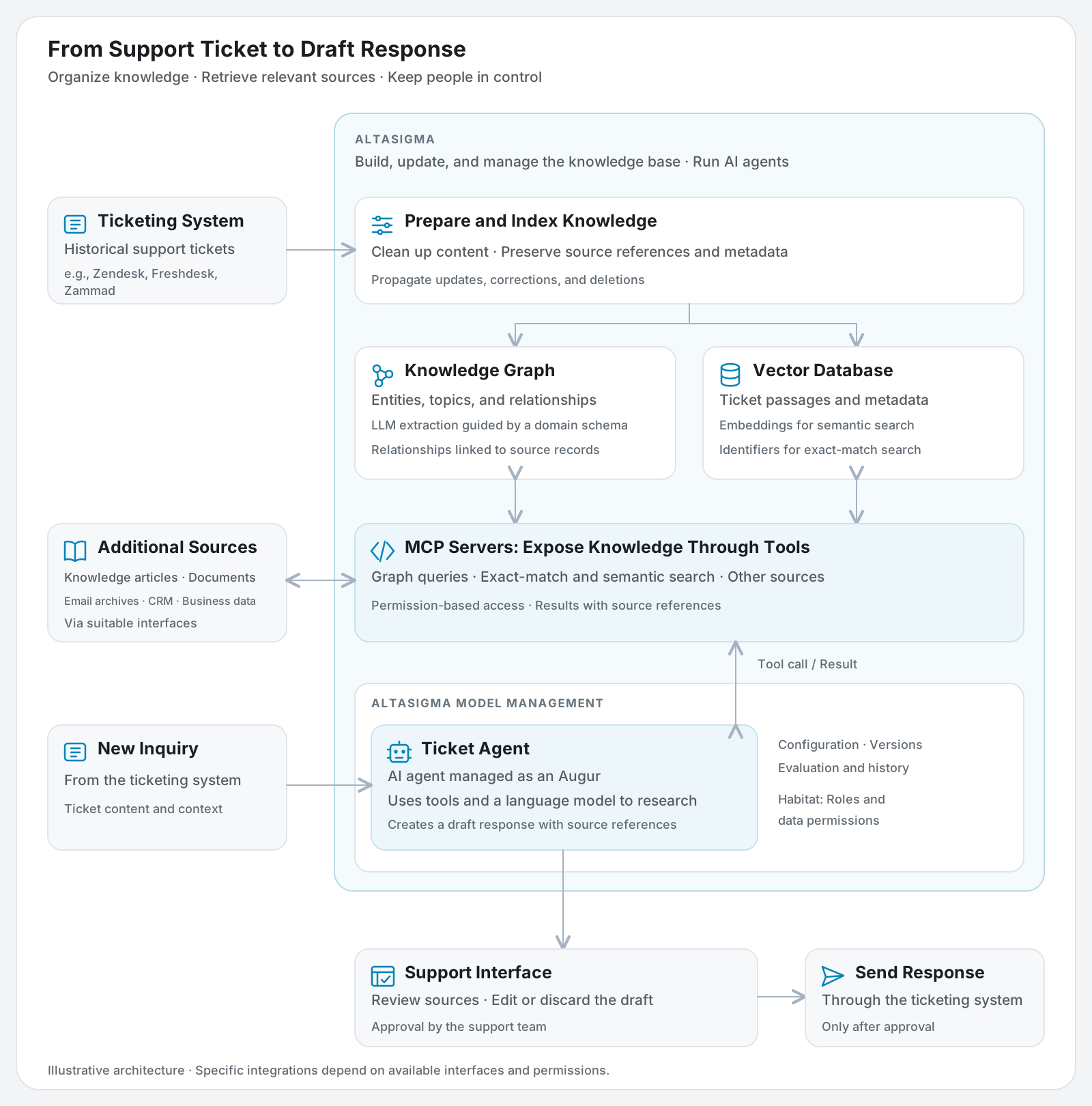
The Ticket Agent brings together research across company knowledge and the handling of new support requests. In AltaSigma, we prepare historical ticket information and maintain it in a knowledge graph and a vector database. MCP tools give the agent access to different perspectives on this knowledge. The graph captures relationships between customers, devices, and service cases. Search across the indexed tickets supports targeted lookups and the discovery of similar cases. Additional sources can be connected through suitable interfaces.
When a new customer inquiry arrives in a ticketing system such as Zendesk, Freshdesk, Jira Service Management, or Zammad, the Ticket Agent researches relevant case histories, past support tickets, and potential solutions. It uses this information to draft a response with references to the sources it draws on. The support team can review and edit the draft within the ticket workflow. How the agent integrates with a particular ticketing system depends on the interfaces and permissions available.
The Ticket Agent is an AI application managed in AltaSigma Model Management, where it is known as an Augur. This is where we configure the language model it uses, the sources it can access, and the tools it is allowed to call.
Knowledge Graph: Connecting Tickets, Customers, and Service Cases
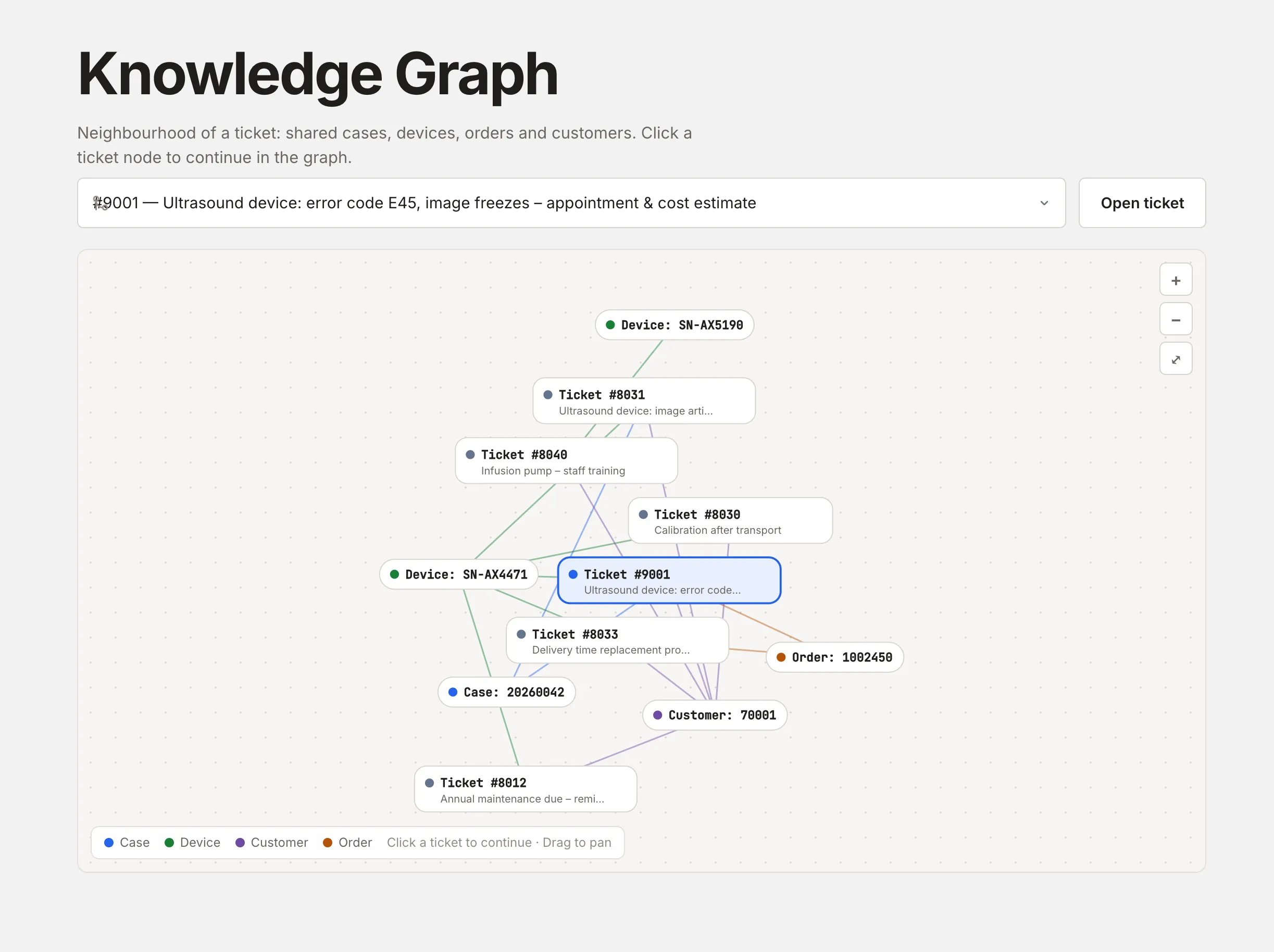
Support tickets rarely stand alone. They belong to customers, refer to specific products or devices, and document service cases, orders, or previous troubleshooting attempts. These entities often appear across multiple tickets. As a result, information about a single case may be spread across different inquiries and points in time.
To draft an appropriate response, the agent needs to identify which information belongs to the current inquiry and how it fits together. A knowledge graph makes these relationships explicit: customers, devices, orders, and other relevant entities are extracted from ticket content and linked to one another and to the original tickets. This makes it possible to trace what has already been reported about a device, what action has been taken, and which questions remain open.
Consider a fictional example: Example Company writes, “Device A is showing an error again. Can you send us a replacement part?” The relationships between the device, service case, and order lead to an earlier ticket that already documents a replacement part order. This gives the agent the context to acknowledge the existing order in its draft and first clarify its status.
How We Capture These Relationships
To build the graph, we use a large language model (LLM) to extract entities and relationships from ticket text and assign topics. Entities include customers, devices, and orders. Existing ticket fields supplement the information extracted from the text.
A shared domain schema defines which entities and relationships matter. An ontology can formally describe these concepts and relationships, such as an order belonging to a service case. A lightweight schema may be sufficient to get started.
A reliable graph requires resolving different references to the same device and checking that the relationships make sense. Unique identifiers and links to the original sources support this process. Two tickets sharing a customer ID, for example, does not necessarily mean they belong to the same case.
Vector Search: Finding Similar Problems and Relevant Solutions
Relevant knowledge also exists in tickets for other customers, devices, or service cases. A similar problem may already have occurred and been resolved elsewhere. In these cases, the connection lies in the problem being described, even when there is no direct link through shared entities.
To make these cases discoverable, we use an embedding model to convert the prepared ticket content into numerical representations and index them in a vector database. When a new inquiry arrives, the system searches for ticket passages with similar meaning. This makes it possible to find related problem descriptions and documented solutions even when customers use different wording.
Additional filters, such as product or version, help narrow the search to relevant cases. Whether a previous solution applies to the current case still needs to be assessed against the specific circumstances.
The two approaches provide complementary information. The knowledge graph retrieves what is already known about the specific customer, device, or service case. Semantic search adds experience from other cases involving similar problems. In our example, the graph identifies the existing replacement part order, while vector search finds a similar issue and its documented solution for another customer. Together, they provide richer context for the draft response, covering both the case history and potential solutions. This targeted retrieval and use of knowledge follows the principle of retrieval-augmented generation, or RAG.
MCP Tools: How the Agent Accesses Knowledge
Search capabilities are exposed to the agent as tools through the Model Context Protocol (MCP). An MCP server describes which tools are available and what inputs they accept. In our setup, these include exact-match ticket search, semantic ticket search, and queries for relationships in the knowledge graph.
The agent selects the appropriate tools from those it is authorized to use and can request additional information based on a tool's results. The sequence of searches can therefore vary from one inquiry to another. Results include references to their sources. Configured permissions determine which data is accessible.
Additional MCP servers can connect other sources, such as internal knowledge bases, product documentation, email inboxes, or CRM systems. We select these based on the use case. MCP standardizes tool access, while suitable interfaces and permissions remain prerequisites. Our AI Agents page explains how these elements work together.
Turning a Ticket Archive into Searchable Knowledge
Why do historical records need to be prepared? Sending the entire collection of resolved tickets to a language model for every new customer inquiry is inefficient and expensive. Most of the content is irrelevant to the question at hand. As the archive grows, so do the amount of text to process, the cost, and the response time. Eventually, the collection will also exceed the model's context window.
We therefore prepare the tickets so the agent can retrieve the specific information it needs. This includes cleaning up the text, extracting entities and relationships, and indexing the content for search. With the right tools, the agent can then look up a case, explore related information, or find similar problems.
This turns the ticket archive into a searchable knowledge base. The agent can first identify relevant cases, then retrieve individual ticket histories in more detail as needed. The language model receives context tailored to the inquiry, with traceable sources.
From Support Ticket to Draft Response, with a Human in the Loop
The diagram below shows how the knowledge base and Ticket Agent managed in AltaSigma connect to source systems and the support interface.
Turning Retrieved Context into a Response
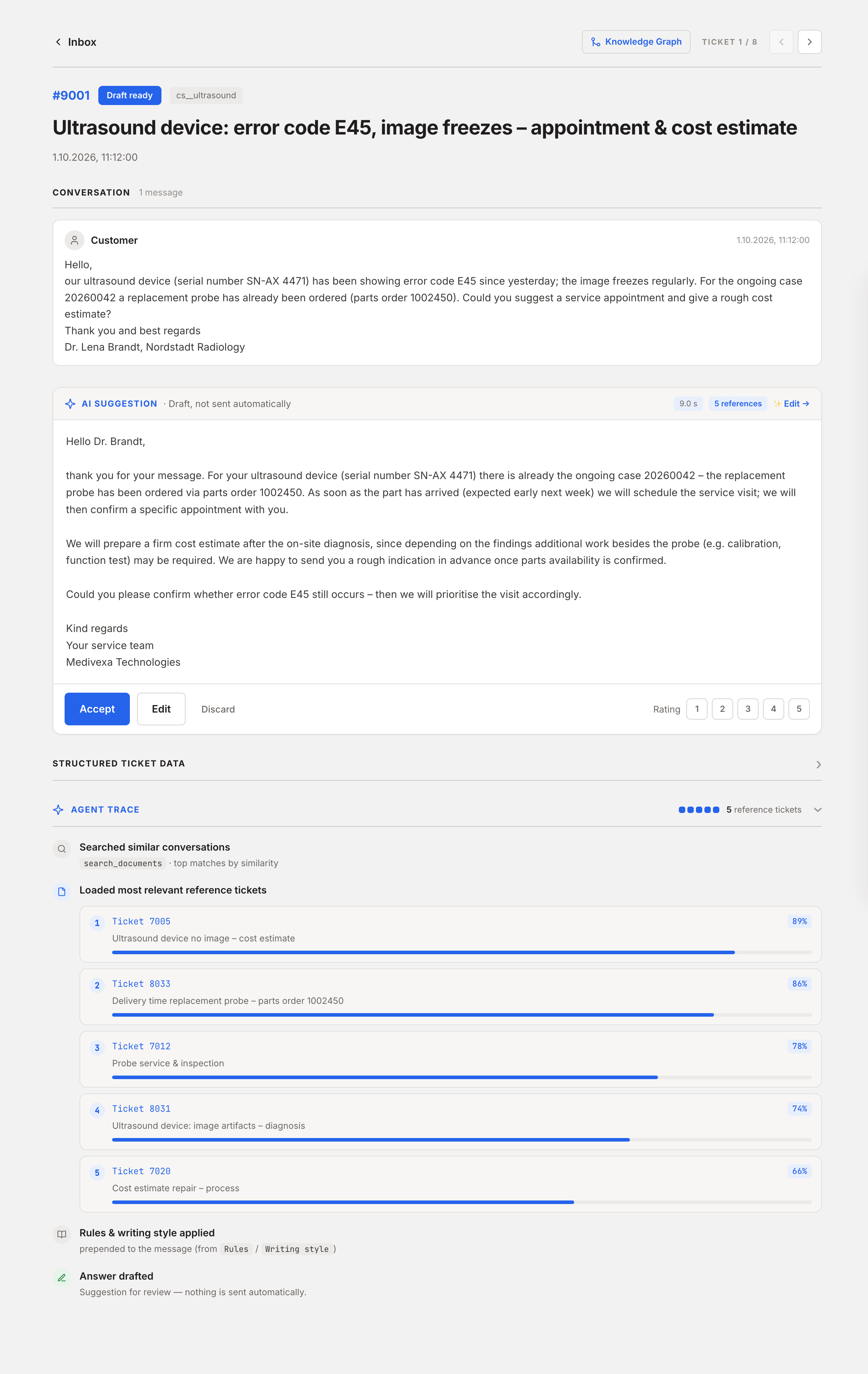
For Example Company's inquiry, the agent has found the previous order. The available information does not establish whether the replacement part has arrived. An appropriate draft therefore references the existing case and asks for the missing information:
This example illustrates an important choice: when information is missing, a focused follow-up question may be the right response. In the internal view, the support team can check the referenced tickets to understand the basis for the draft and, if needed, verify the current order status in the relevant system.
The Support Team Makes the Final Decision
Team members review the content and sources, add missing details, and adjust the wording. They can accept, revise, or discard the draft. The response is sent only after a person approves it. This required review step keeps a human in the loop. The corrections made during review also reveal where retrieval or response generation needs improvement.
Managing Quality and Operations in Model Management
One successful example conversation is not enough to establish readiness for deployment. Evaluation needs to cover typical inquiries as well as cases with conflicting or missing information. The key questions are whether the agent identifies the right case, whether its statements are supported by sources, and what substantive corrections the support team needs to make.
AltaSigma Model Management supports reference cases and reference answers for this purpose. Changes to the agent are versioned. Augur Time Travel lets teams compare settings and quality metrics across versions and reactivate an earlier version. These comparisons also need to account for the state of the connected sources. When testing historical cases, the eventual target answer must not already be available as a retrieval result.
The deployment environment depends on infrastructure requirements and the level of control needed over data. We discuss deployment options in “Generative AI for Analyzing Confidential Enterprise Data”.
Start with One Knowledge Source and Expand as Needed
Getting started does not require making all of the company's knowledge available at once. A defined collection of tickets can serve as the first knowledge source. The modular approach to connecting sources through MCP tools allows additional sources and search capabilities to be added incrementally, such as product documentation, internal knowledge articles, or current case data from a CRM system.
Actual support inquiries provide a basis for evaluating which additions are worthwhile. Where is information missing? Which additional source helps fill those gaps? And does it actually improve the draft responses? The system grows in response to demonstrated needs. Teams can start with a manageable scope without having to integrate every future source and use case up front.

LLM·15 min read
Code Smarter, Not Harder: The Speed Benefits of LLMs in Data Science
Read article
Uplift Modeling·6 min read
Uplift Modeling – Testing the impact of marketing treatments
Read article
Explainable AI·5 min read